
Using the Fortify Action
Select the Fortify action by pressing the "Fortify" button under the game map. When the Fortify action is selected, clicking the mouse on the game map in a land area occupied by your nation will cause your forces to build defensive fortifications in that land area. Each time you fortify a land area, one of your nation's fortification points is spent. You may only fortify an area if your nation has one or more fortification points to spend.

The
Fortify action button.
Fortification Points
Fortifications use three separate values. Supportable Fortifications is how many deployed fortification levels your nation can sustain. Renewable Fortifications is your natural regeneration rate and equals 10% of your current effective Supportable Fortifications every 24 hours, plus any explicit Permanent Fortification technology bonuses. This regeneration is delivered evenly throughout the day into Fortifications in Reserve. Natural regeneration stops when Reserve reaches five times your current Renewable rate. Immediate or purchased fortification points may take Reserve above that natural cap; they are never deleted merely because Reserve is over the cap.
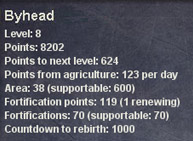
Fortification
info displayed in the Nation Panel.
You can find out how many fortification points your nation has at any time by checking the Nation Panel. The number of fortification points is displayed beneath your nation's area. You can also find out exactly how many permanent and temporary fortification points you have, by checking the Technology Summary panel.
The uses of Fortification
If a land area is fortified, a successful attack against that area will only decrease its number of fortifications by one. The attacking nation cannot succeed in occupying the area until it is no longer fortified at all. Since a single land area may be fortified many times, you can make it very difficult and time consuming for an attacker to penetrate your defenses. This is especially useful when you are able to fortify a few land areas across a narrow pass that is the only path to an area you wish to defend.
There are some powerful weapons in Defend & Conquer that allow a nation to actually swap ownership of one land area with another. If you succeed in your attack against an enemy nation using such a weapon, you will end up occupying the land area that you attacked, and your enemy will in turn end up occupying a neighboring land area that you had previously occupied. Fortification is effective in thwarting this kind of attack. A fortified land area cannot be "swapped" in this manner.
Supporting your Fortifications
Your fortifications need to be supportable by your nation, or they will fall into disrepair and decay. The number of fortifications that your nation can support is determined by your nation's area and level; the greater the area your nation controls, and the higher its level, the more fortifications it can support. The number of fortifications that your nation currently has, as well as the maximum number it can support, are displayed in the Nation Panel, below your nation's number of fortification points.
Your nation may build above its Supportable Fortifications limit, but doing so has two penalties. While over the limit, Geographic efficiency is reduced according to how far over capacity the nation is. In addition, 10% of the excess fortifications are lost per 24 hours, with that loss applied gradually across the day, until deployed fortifications return to a supportable level.
The Appearance of Fortified Land Areas
If a land area is fortified, a picture of a stone tower is displayed on that area. If the area has an object in it, such as a prize orb or a resource, then the fortification tower will appear smaller and toward the left side of the area. The more that an area is fortified, the taller this tower will grow. As the fortifications are chipped away by successful attacks, the tower will shrink and finally disappear.
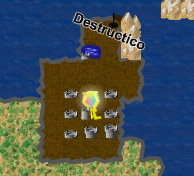
A
nation that has fortified several of its land areas to different
degrees, including Fresh Water and an Orb of Destiny.
Repeat Fortifying
Often you may want to fortify a land area several times in a row, so that your enemies will find it more difficult to take from you. You can do this automatically by checking the "Repeat" checkbox in the lower left corner of the progress screen that appears while your land area is being fortified.
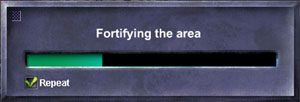
The
Fortify progress screen, with the Repeat checkbox checked.
While
the Repeat checkbox is checked, your nation will continue to fortify
that same land area until either you stop it by unchecking the Repeat
checkbox, or it has spent all of its fortification points. Note
that a single land area can be fortified no more than 50 times.
Fortifying
During Battle
A
land area cannot be fortified for one full minute after it's been
successfully attacked by an enemy. This makes fortifying your holdings
during battle tricky; you will need to drive the enemy away from
the areas that you wish to fortify and hold them off before you'll
be able to reinforce your fortifications.
•To learn more about the game map, click here.
•To
learn more about Permanent and Temporary Fortification, click here.
